The One Hour Web Designer Get the course · $199

The tools moved faster than the market

Build websites for real businesses. Let Claude write the code.

Find a local business that needs a website, build it with AI, and handle the job from the first call to the final invoice. You don't have to know how to code.

Designed around one focused hour a day, for 30 days

$199 once for the course. Full refund if you ask within 14 days, no conditions.

The tools it runs on, Claude Pro and Eden Personal Plus, cost about $35 a month while you use them (every cost, what Eden is).

Ch 1 · SessionExample session

The bakery wants their hours and a catering form up front.

ClaudeGot it. I'm moving the hours into the hero and adding a catering form that emails the owner. The preview is ready. Check it at phone width before we publish.

Make the button say "Order catering".

ClaudeDone. Saved a checkpoint.

Ch 2 · PreviewExample site
An illustration of how a session works. The bakery is made up.
  • Claude plans each step with you, coaches the business side and writes the code.
  • You talk to clients, make the decisions, approve the work and send it.

If any of these sound familiar, keep reading

  • You're comfortable with a computer, and you've watched AI do things that would have taken a team a few years ago.
  • You've looked at side businesses before. Most wanted money up front, a stack of subscriptions, or skills you'd have to spend a year learning.
  • You've seen a local business with a website from 2012, or none at all, and thought "I could fix that." Then you didn't know where to start.
  • Your day is already full, and you need a path that tells you what to do next.

The tools got good. Most business owners haven't noticed.

A few years ago, a decent small-business website took a designer, a developer and someone to manage them. For a simple site, one person directing Claude can now do the job.

Think about the owner of a plumbing company, a bakery or a dental office. They're busy running a business. Most haven't seen what these tools do now, and they aren't going to find the time to learn.

That gap is the opportunity. Someone has to ask the questions, write the brief, check the result and put the site live. You can be that person.

I'm not going to promise you a number. I'll show you the process I used, and you can judge it.

“Why would anyone pay me when they could use AI themselves?”

They could. Plenty of people could also fix their own sink.

A business owner can open Claude. They still have to:

  • Work out what to ask for
  • Gather their photos and details
  • Review every page
  • Connect the domain
  • Check that the contact form works

They don't have time for that.

You take on the project, and those jobs become yours:

  • You ask the questions
  • You check the site on a phone
  • You make the changes you agreed to
  • You hand it over so the owner never has to think about it again

The course teaches you to do that with AI, and to recognize the jobs that are too big for you yet. You start with simple sites.

One AI that coaches and builds. One dashboard that keeps track.

Claude

Works on your computer. It leads you through the lessons, builds and publishes your sites, and helps you find clients, price the work, write proposals and send invoices. It follows my method and gives you one clear next step that matches your level.

The course in Eden

Eden is a workspace app for notes, research and online courses, at eden.so. This course lives there: you read the short lessons and copy the templates in Eden, and it holds the method Claude follows. Claude connects to it through Eden's Personal Plus plan and reads the course without using any credits.

Your Agency Status note

A one-page dashboard in Eden, kept current by Claude: where you are, your live sites, your clients and what's next. You pick up where you left off, every time.

A building session, start to finish

  1. StartOpen your agency folder in Claude and say "Start my session." Claude tells you where you are and the next step.
  2. LearnIf it's a new lesson, read it in Eden, or ask Claude for the short version. Then you do it together.
  3. DesignClaude shows you three design directions with previews. You pick one, then build the site section by section.
  4. CheckCheck every page at desktop and phone size. Ask for changes. Approve it before it goes online.
  5. WrapSay "wrap." Claude saves your work, updates your dashboard and tells you what's next.

You make the decisions, talk to clients and approve the work. The tools do the typing.

Sites that don't look like AI made them

You've seen it: the same gradient, the same layout, the same vague headline. Clients notice too.

So before Claude builds anything, it proposes three design directions with previews. You choose one. The builder kit also includes an anti-generic-design checklist, which gives you specific things to look for and fix before you show the site to anyone.

Morning PaperA
Corner ShopB
Flour and LightC

A real site, built with this method

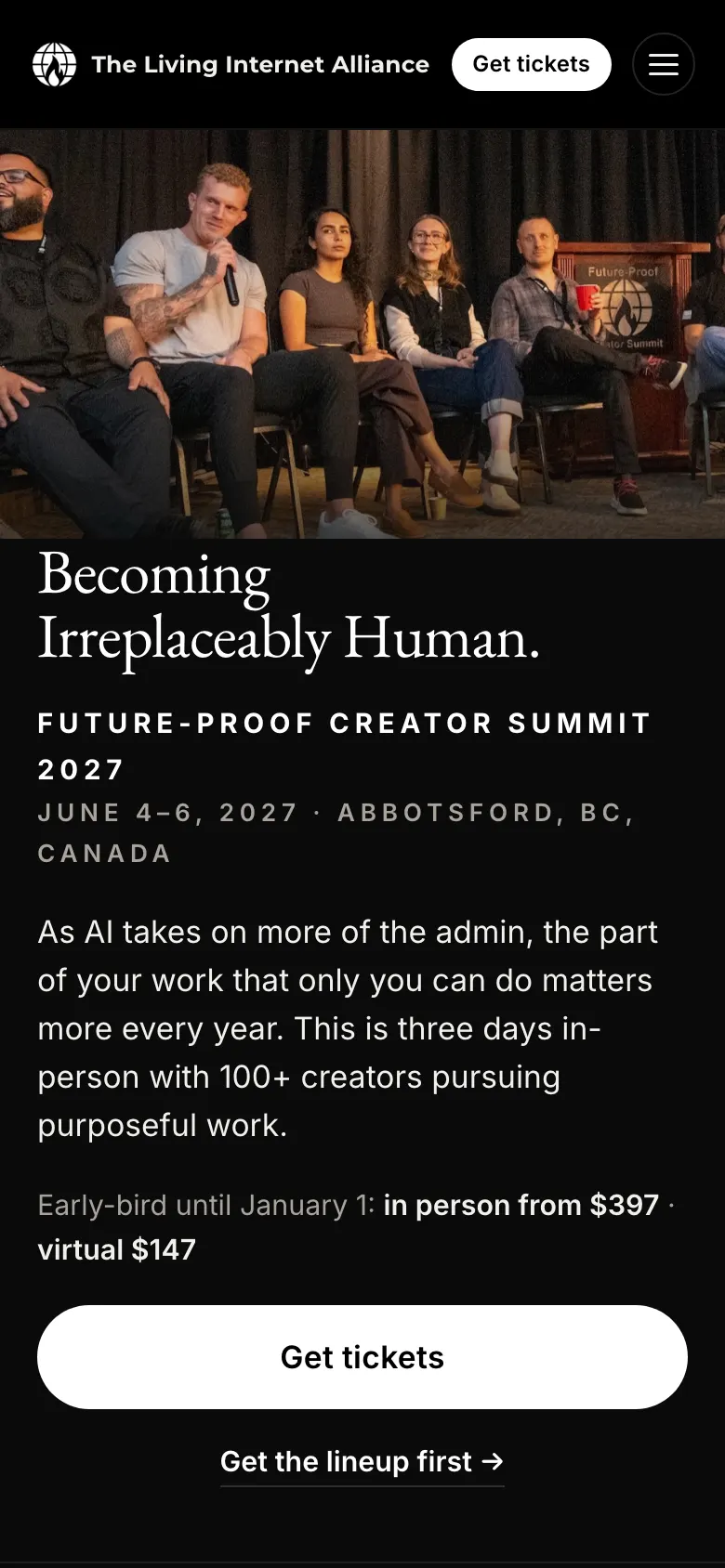
The site for The Living Internet's Future-Proof Creator Summit. I built it with the same method this course teaches: a brief, a design direction, then section by section with Claude.

thelivinginternet.comLive site
The full home page of thelivinginternet.com, from the summit headline down through the program, tickets, photos, questions and footer.
Scroll inside the frame to see the whole page.
The same site on a phone: the summit headline, dates and a full-width Get tickets button.

About 3 hours of active work, plus about an hour of small fixes along the way.

  • Three ticket tiers with early-bird prices and checkout
  • A newsletter signup, with a fallback link if the form doesn't load
  • Program, founder's note, photos from last year and questions, all on one page that works on a phone
Visit the live site (opens in a new tab)

What you'll have at each stage

15 short lessons in five sections. You'll finish each one with something real.

  1. Get set up

    Claude connected to the course in Eden, and a builder kit that Claude writes into your own folder. Plan on one long evening for setup. You can split it up.

  2. Build your first site

    Your own portfolio, with words that sound like you, live online. The course is designed so this can happen in your first week.

  3. Learn what a client site needs

    Multi-page sites, forms, booking links, payment links, and the checks to run before you call a project finished.

  4. Find and close clients

    A niche, a list of local businesses, outreach scripts, follow-ups, pricing and a written proposal.

  5. Deliver

    Agreement, invoice, delivery checklist and handoff document. When you're ready, monthly care plans for clients who want ongoing help.

1 hour a day × 30 days

The course is designed so that about one focused hour a day for 30 days takes you through all 15 lessons, and leaves you able to take on and deliver a simple site for a paying client. That's the design, not a promise: your pace will vary, and finding the client is up to the conversations you start.

Inside the course

What the lessons cover, and what Claude helps you do in each part.

  • Design and build

    A brief, references and three design directions before anything is styled. Then domains and DNS, contact forms, payment links and booking links, and the checks to run before a site goes live.

  • Words that work

    A recorded interview with the owner, customers' own words, a one-page message map, and a copy deck the owner approves before any words go on the site.

  • Graphics and photos

    A clean name treatment, or the client's own logo set up properly. A favicon, a share image for links, one icon set, and photos prepared for the web with location data removed. Clear rules for AI images; the course doesn't recommend a tool.

  • Finding and closing clients

    Choosing a niche, finding local businesses, outreach and the first call, pricing, and a written proposal.

  • Delivering

    Contracts and invoices, onboarding with a shared Project Hub for each client, what to ask clients for (a PNG logo with a transparent background, the original photos) and what to do with whatever arrives. Then launch, the handoff and monthly care plans.

  • Bigger jobs

    Bringing in a designer or photographer: whether to refer the work or subcontract it, the brief, the agreement, the money and the feedback.

Your Agency Status note in Eden keeps track of all of it: where you are, your live sites, your clients and what's next.

What's included

  • 15 short lessons

    A clear path from setup to a delivered client site.

  • A coaching method Claude follows with you

    Niche, outreach, pricing, proposals, contracts and delivery. Ask Claude what's next, how to price a job or how to answer a client, and get an answer built on my method.

  • A builder kit of more than 50 files

    Everything Claude needs to build, check and publish sites on your computer. The whole kit takes up less than 3 MB of disk space.

  • A prompt library

    87 ready-made prompts for every stage, from whole-site layouts to final checks before a site goes live.

  • 11 copyable templates

    Agency Status, client record, prospect tracker, Project Hub start note, onboarding questionnaire, proposal, project agreement, invoice, delivery checklist, handoff document and partner brief, so you never start from a blank page.

  • An Agency Status note

    Your one-page dashboard, kept current by Claude.

  • 250 Eden credits

    For the course chat in Eden: setup help, and quick questions when you're away from your computer.

  • Updates

    The course and kit stay current as Claude, Eden and hosting tools change.

Your sites run on your own GitHub and hosting accounts. They keep working without Eden or Eden credits.

What it costs, all in one place

To start: $199 once, plus about $35 a month for Claude Pro and Eden Personal Plus.

See every cost
The course
$199 once. Lessons, builder kit, templates, prompt library, the coaching method Claude follows, and 250 Eden credits for the course chat in Eden.
Claude Pro
About $20 a month. Required. You pay Anthropic directly. Claude Pro has usage limits: one resets every five hours, plus a weekly limit. The course works on Sonnet by default and keeps each session to one task.
Eden Personal Plus
$15 a month, or $150 a year (about $12.50 a month). Required. It's the Eden plan that connects Claude to the course and to your notes; Eden's free and Personal plans can't connect. It also adds 150 AI credits a month and unlimited saved items. Claude reading the course uses no credits: the 250 included credits are only for the course chat in Eden. You pay Eden directly.
Eden Starter
$29 a month, or $299 a year. Not needed. Newsletters, lead forms, scheduled posts and a store, for later, once you've delivered a client.
Hosting
Free. Paying clients' sites run on Cloudflare Pages. Your portfolio and unpaid sites run on GitHub Pages.
Domains
About $10 to $20 a year each. Usually the client pays.
Optional
The Rebellion Community, $7 a month. Separate from the course. Human feedback on your sites, pitches and prices.

Jesse is an Eden affiliate and may earn a commission on some Eden purchases, at no extra cost to you.

This is for you if you're willing to make the calls

You'll fit if you're comfortable on a computer, you're willing to learn by building, and you can check an AI's work before it goes to a client.

You don't need a design degree or any coding experience. You do need to pick up the phone, send the emails and follow through on what you agree to. Some people will say no. Some won't answer. The course gives you scripts and a follow-up system. You still have to start the conversations.

If you want a business that never talks to customers, this isn't it.

Highly recommend this! Jesse James Carver helped out big time with learning how to design websites!

Sam Elsner

Questions

Do I need to know how to code?

No. Claude writes the code. You learn to describe what you want, check the result and ask for changes.

Does "One Hour" mean I can build a site in an hour?

No. It's the name of the course. One focused hour a day for about 30 days is the pace the 15 lessons are designed around. Setup, revisions and client projects take as long as they take.

Will I get clients?

I can't promise that, and neither can anyone else. The course gives you a process: pick a niche, find businesses, reach out, follow up and track every attempt. You control how many conversations you start.

I use Claude, but never to build things. Is this for me?

Yes. If you can chat with Claude, you have what you need to begin. The course adds the building and the business, and Claude coaches you through both.

What if the sites look obviously AI-generated?

You pick from three design directions with previews before anything gets built, and the kit includes a checklist for catching generic design. You'll learn what to look for.

What if a client asks for something I can't build?

Claude helps you decide whether to scope it down, bring in a partner or refer it. Bigger builds like online shops and members' areas take more skill, and the course shows you where that line is.

Will I hit Claude's usage limits?

You might. Claude Pro has a limit that resets every five hours and a weekly one. The course works on Sonnet by default and keeps each session to one task. If you reach a limit, nothing is lost, and the message tells you when it resets.

What is Eden, and why do I need it?

Eden (eden.so) is a workspace app for notes, research and online courses. This course is sold and hosted there. You read the lessons and templates in Eden, your Agency Status dashboard and client notes live there, and Claude connects to it to read the course. You need Eden's Personal Plus plan, $15 a month or $150 a year, because it's the plan that lets Claude connect. The course includes 250 credits for the course chat. The course is written by Jesse, not by Eden.

Why do I need Eden Personal Plus?

Eden's connection to Claude starts on Personal Plus; the free and Personal plans can't connect. It's how Claude reads the course and keeps your dashboard, client notes and prospect list up to date. It also gives you 150 AI credits a month and unlimited saved items, plus the client tools the course uses: a shared board for each client, a booking link, a testimonials link and a link page. Jesse is an Eden affiliate and may earn a commission on some Eden purchases, at no extra cost to you.

What's the Eden chat for, if Claude does the coaching?

Setup help before Claude is working, and quick questions when you're away from your computer.

Is the contract and invoice material legal advice?

No. It's general information and templates. Have a professional review anything you rely on.

Are the prices in the course what I should charge?

They're examples for working through the lessons. They aren't typical results or a promise of what clients will pay.

What if I don't like it?

Ask for a refund within 14 days of buying and you get your money back in full, no conditions. Email jesse@thelivinginternet.com.

Ready to start?

Get the course, read Start here (five minutes), then follow Module 1 to set up Claude. If you get stuck before Claude is working, the course chat in Eden helps.

Get the course for $199

$199 once. Full refund if you ask within 14 days of buying. Questions first? Write to jesse@thelivinginternet.com.

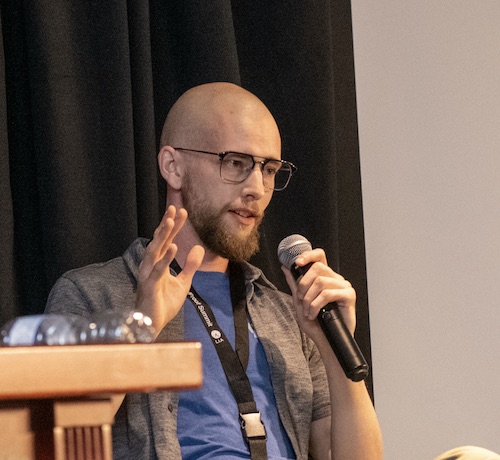
Jesse James Carver speaking into a microphone

About the author

Jesse James Carver wrote this course. He is the founder of The Living Internet Alliance and writes the Social Abundance essays. His store at jesse.eden.so has his other courses and coaching.

See my other work